KI-Beratung Beta

Gutscheinbedingungen

**Gültig vom 23.11. bis 30.11.2026 | Gültig für nicht preisgebundene fremdsprachige Bücher | Einzelne Artikel können ausgeschlossen sein | Online auf www.bücher.de einlösbar | Click & Collect nur mit Online-Zahlung (Paypal/Kreditkarte) vorab | Nicht kombinierbar mit anderen Gutscheinen oder Preisaktionen | Nur einmal pro Einkauf einlösbar | Gutschein wird auf max. 500€ Bestellwert angerechnet | Keine Barauszahlung | Nicht gültig für Versandkosten und Services

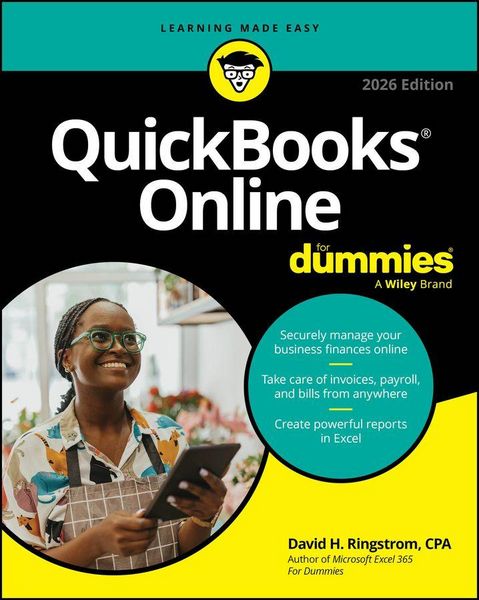
Produktbild: QuickBooks Online For Dummies, 2026 Edition

QuickBooks Online For Dummies, 2026 Edition

29,99 €

inkl. gesetzl. MwSt., Versandkostenfrei


Beschreibung

Step-by-step guidance on the latest version of the popular cloud accounting app

QuickBooks Online For Dummies, 2026 Edition helps you save time and money. This beginner-friendly guide walks you through the basic setup of the online accounting software. Plus, this resource provides detailed guidance...

Beschreibung

Step-by-step guidance on the latest version of the popular cloud accounting app

QuickBooks Online For Dummies, 2026 Edition helps you save time and money. This beginner-friendly guide walks you through the basic setup of the online accounting software. Plus, this resource provides detailed guidance on key features, so you know how to navigate your financial data with ease. With QuickBooks Online For Dummies, 2026 Edition, you'll discover how to use any device to: view and update records, create invoices, record sales, pay bills, manage inventory, print checks, process payroll, prepare tax returns, balance accounts, generate financial reports, and beyond. Best of all? Everything's backed up in the cloud, so you'll get the peace of mind that comes with secure data. Use this Dummies guide to get up and running with QuickBooks Online.

Inside:

  • Make the switch to QuickBooks Online, or set up your business finances from scratch
  • Get easy-to-follow instructions for accessing your data remotely and saving time with automated features
  • Understand the new interface and the latest features, including Project Center and AI integration
  • Stay on top of your budget, your taxes, and your reporting requirements

QuickBooks Online is easy to use for any type of business, and QuickBooks Online For Dummies makes it even easier.

Produktdetails

Einband

Taschenbuch

Erscheinungsdatum

25.11.2025

Verlag John Wiley & Sons Inc
Seitenzahl

400

Produktdetails

Einband

Taschenbuch

Erscheinungsdatum

25.11.2025

Verlag John Wiley & Sons Inc
Seitenzahl

400

Maße (L/B/H)

23,4/18,7/2,7 cm

Gewicht

742 g

Auflage

10. Auflage

Sprache

Englisch

ISBN

978-1-394-36717-7

Herstelleradresse

Libri GmbH
Europaallee 1
36244 Bad Hersfeld
DE

Email: gpsr@libri.de

Noch keine Bewertungen vorhanden

Verfassen Sie die erste Bewertung zu diesem Artikel

Helfen Sie anderen Kundinnen und Kunden durch Ihre Meinung.

Kundinnen und Kunden meinen

Bewertungen (0)

Die Leseprobe wird geladen.
  • Produktbild: QuickBooks Online For Dummies, 2026 Edition
  • Introduction 1

    Part 1: Core Functionality 7

    Chapter 1: Setting the Stage in QuickBooks 9

    Chapter 2: Billing Like a Star, Collecting Like a Pro 33

    Chapter 3: Bagging Expenses, Chilling Bills, and Paying the Tabs 63

    Chapter 4: Tackling Payroll Chores 77

    Chapter 5: Handling Bank Accounts, Deposits, and Transfers 93

    Chapter 6: Exploring QuickBooks Reports 107

    Chapter 7: Implementing Apps and Automation 117

    Part 2: QuickBooks Online Essentials Features 135

    Chapter 8: Managing Users, Multicurrency, and Custom Fields 137

    Chapter 9: Reducing Manual Data Entry 149

    Part 3: QuickBooks Online Plus Features 161

    Chapter 10: Monitoring Inventory and Managing Purchase Orders 163

    Chapter 11: Tracking with Classes, Locations, and Projects 179

    Chapter 12: Formulating Budgets 189

    Part 4: QuickBooks Online Advanced Features 199

    Chapter 13: Mastering the Admin Tools in QuickBooks Advanced 201

    Chapter 14: Generating Custom Reports and Charts 213

    Chapter 15: Unlocking Advanced Tools and Taming Tasks 219

    Chapter 16: Animating Your Data with Spreadsheet Sync 239

    Part 5: QuickBooks Online Accountant Features 253

    Chapter 17: Assembling Your Client and Team Roster 255

    Chapter 18: Overhauling Books with Accountant Tools and Templates 271

    Chapter 19: Taming the Herd with Practice Tools 291

    Part 6: Microsoft Excel Analysis 301

    Chapter 20: Unleashing Your Data in Excel 303

    Chapter 21: Automating QuickBooks Analysis with Power Query 321

    Part 7: The Part of Tens 337

    Chapter 22: Ten Common Journal Entries 339

    Chapter 23: Ten-Plus Cool Chrome Shortcuts 351

    Chapter 24: Ten Things QuickBooks Won't Tell You 357

    Index 363