KI-Beratung Beta

Gutscheinbedingungen

**Gültig vom 23.11. bis 30.11.2026 | Gültig für nicht preisgebundene fremdsprachige Bücher | Einzelne Artikel können ausgeschlossen sein | Online auf www.bücher.de einlösbar | Click & Collect nur mit Online-Zahlung (Paypal/Kreditkarte) vorab | Nicht kombinierbar mit anderen Gutscheinen oder Preisaktionen | Nur einmal pro Einkauf einlösbar | Gutschein wird auf max. 500€ Bestellwert angerechnet | Keine Barauszahlung | Nicht gültig für Versandkosten und Services

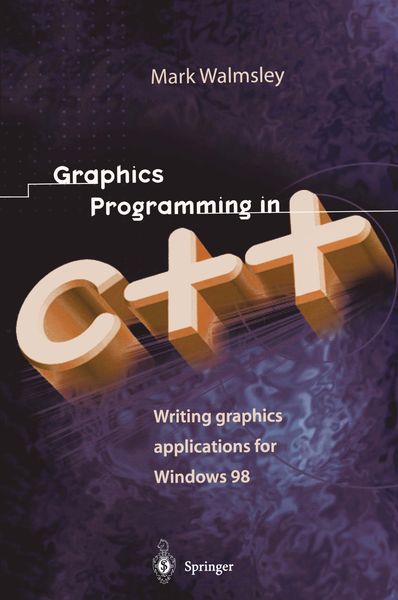
  • Produktbild: Graphics Programming in C++
  • Produktbild: Graphics Programming in C++

Graphics Programming in C++ Writing Graphics Applications for Windows 98

49,99 €

inkl. gesetzl. MwSt., Versandkostenfrei


Beschreibung

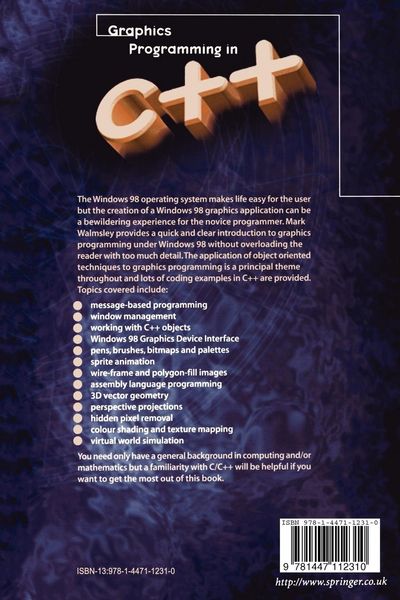
This is a book about computer graphics. It is aimed primarily at anyone wishing to develop graphics applications for Windows 98 and attempts to provide a quick and clear introduction to the subject without encumbering the reader in a mass of extraneous details. The application of object oriented techniques...

Beschreibung

This is a book about computer graphics. It is aimed primarily at anyone wishing to develop graphics applications for Windows 98 and attempts to provide a quick and clear introduction to the subject without encumbering the reader in a mass of extraneous details. The application of object oriented techniques to graphics programming is a principal theme throughout the text and most of the software is written in C++ so a familiarity with C/C++ will be helpful - for a fuller introduction to the C++ language than is possible here consult the book 'Programming in C++' (ISBN 0 85934 435 5). Beyond this only a general background in computing and/or mathematics is assumed and whenever new ideas are encountered they are fully explained with the aid of line-drawings and 10 also introduces the illustrative coding examples. For those brave enough chapter topic of 80 x86 assembly language programming - without dedicated graphics hardware this is still the best way to produce really snappy animation code.

Produktdetails

Einband

Taschenbuch

Erscheinungsdatum

27.09.2011

Abbildungen

X, 250 p.

Verlag Springer London

Produktdetails

Einband

Taschenbuch

Erscheinungsdatum

27.09.2011

Abbildungen

X, 250 p.

Verlag Springer London
Seitenzahl

250

Maße (L/B/H)

23,5/15,5/1,5 cm

Gewicht

406 g

Sprache

Englisch

ISBN

978-1-4471-1231-0

Herstelleradresse

Springer-Verlag GmbH
Tiergartenstr. 17
69121 Heidelberg
DE

Email: ProductSafety@springernature.com

Noch keine Bewertungen vorhanden

Verfassen Sie die erste Bewertung zu diesem Artikel

Helfen Sie anderen Kundinnen und Kunden durch Ihre Meinung.

Kundinnen und Kunden meinen

Bewertungen (0)

  • Produktbild: Graphics Programming in C++
  • Produktbild: Graphics Programming in C++
  • 1. Message-Based Programming.- 1.1 Windows 98 Programming.- 1.2 Window Components.- 1.3 Message Queues.- 1.4 Window Callback Functions.- 1.5 The WinMain () Function.- 1.6 Windows 98 Messages.- 1.7 Some Important Messages.- 1.8 Summary.- 2. Window Management.- 2.1 Window Classes.- 2.2 Creating a Window.- 2.3 WinMain () Revisited.- 2.4 Message Handlers.- 2.5 The Hello Program.- 2.6 Windows 98 Program Framework.- 2.7 Summary.- 3. Object Orientation.- 3.1 Object Oriented Programming.- 3.2 The Manager Object.- 3.3 Windows and Objects.- 3.4 Message Boxes.- 3.5 Popup Menus.- 3.6 The VIEW Class.- 3.7 Summary.- 4. Pens and Brushes.- 4.1 Graphics Device Interface.- 4.2 GDI Objects.- 4.3 Windows 98 Coordinate Systems.- 4.4 GDI Drawing Functions.- 4.5 Tracking the Mouse.- 4.6 Summary.- 5. Bitmaps.- 5.1 Pixels and Colours.- 5.2 Windows 98 Resources.- 5.3 Displaying a Bitmap Resource.- 5.4 The DIB Class.- 5.5 Storing Images in Files.- 5.6 Summary.- 6. Palettes.- 6.1 Logical and System Palettes.- 6.2 Palette Messages.- 6.3 Creating a Palette.- 6.4 The PALETTE Class.- 6.5 Updating the DIB Class.- 6.6 Summary.- 7. Sprite Animation.- 7.1 The SPRITE Class.- 7.2 Animation.- 7.3 Flicker.- 7.4 Transparency.- 7.5 Threads.- 7.6 Summary.- 8. Wire-Frame Graphics.- 8.1 Polygon Worlds.- 8.2 The WORLD and SCENE Objects.- 8.3 Line Drawing.- 8.4 Line Clipping.- 8.5 Summary.- 9. Polygon-Fill Techniques.- 9.1 The GDI Approach.- 9.2 Polygon Outlines.- 9.3 Filling with a Solid Colour.- 9.4 Drawing 3D Images.- 9.5 Virtual World Chunks.- 9.6 Summary.- 10. Assembly Language Programming.- 10.1 Computer Basics.- 10.2 Updating the Message Loop.- 10.3 The 80x86 Registers.- 10.4 Data Transfer.- 10.5 Arithmetic and Logical Operations.- 10.6 Flow Control.- 10.7 Faster Polygon-Fill Routines.- 10.8 Program Stack.- 10.9 Summary.- 11. Mathematics of 3D Geometry.- 11.1 Vectors and Matrices.- 11.2 The VECTOR Class.- 11.3 Scalar Product.- 11.4 Vector Product.- 11.5 Triple Product.- 11.6 Lines and Planes.- 11.7 Summary.- 12. Projection of the Viewing Volume.- 12.1 Perspective Projections.- 12.2 The Viewing Volume.- 12.3 Taking a Snapshot.- 12.4 Projecting and Clipping.- 12.5 A Vanishing Cube.- 12.6 Summary.- 13. Hidden Pixel Removal.- 13.1 Constructing a Scene Image.- 13.2 The Painter’s Algorithm.- 13.3 Separating Planes.- 13.4 Binary Space Partitioning.- 13.5 Drawing in Reverse.- 13.6 Z-Buffers.- 13.7 Summary.- 14. Colour Shading and Textures.- 14.1 Lights and Surfaces.- 14.2 Shading Options.- 14.3 Texture Mapping.- 14.4 Implementation Optimizations.- 14.5 Depth Perception.- 14.6 Summary.- 15. In Motion.- 15.1 The Graphics Pipeline.- 15.2 Animating the Virtual World.- 15.3 Translations.- 15.4 Rotations.- 15.5 Transforming Coordinates.- 15.6 Summary.- Postscript.